CCBot Common Crawl: Complete Guide to Block & Control
Learn about CCBot crawler, how Common Crawl bot collects AI training data, and how to block CCBot using robots.txt. Complete technical guide.
Table of Contents
- What is CCBot and Common Crawl
- Why Common Crawl Exists
- How CCBot Crawler Works
- How to Check Your Site in Common Crawl
- Blocking CCBot Using Robots.txt
- Common Crawl Opt-Out Registry
- Verifying Authentic CCBot Crawlers
- CCBot vs Other Web Crawlers
- AI Training Data Reality
- Impact of Blocking CCBot
- Technical Details of CCBot/2.0
- What Happens After Blocking
- Monitoring CCBot Activity
- Legal and Ethical Considerations
- End
- What is CCBot and Common Crawl
- Why Common Crawl Exists
- How CCBot Crawler Works
- How to Check Your Site in Common Crawl
- Blocking CCBot Using Robots.txt
- Common Crawl Opt-Out Registry
- Verifying Authentic CCBot Crawlers
- CCBot vs Other Web Crawlers
- AI Training Data Reality
- Impact of Blocking CCBot
- Technical Details of CCBot/2.0
- What Happens After Blocking
- Monitoring CCBot Activity
- Legal and Ethical Considerations
- End
What is CCBot and Common Crawl
CCBot is the web crawler operated by Common Crawl, prominently identified as CCBot/2.0 in its user agent string. This bot continuously scans and downloads billions of web pages monthly, contributing to publicly available datasets crucial for AI training data. Common Crawl is a major player, having run since 2007 and offering one of the largest publicly available web archives. With 3 to 5 billion new pages added monthly, it plays an integral role in AI development—OpenAI’s GPT-3, for example, used 60% of its training tokens from Common Crawl data. Many large language models rely heavily on these datasets. Understanding CCBot is essential because your content might already be contributing to AI training datasets. Website owners can manage how CCBot interacts with their sites via standard web protocols such as robots.txt.
Why Common Crawl Exists
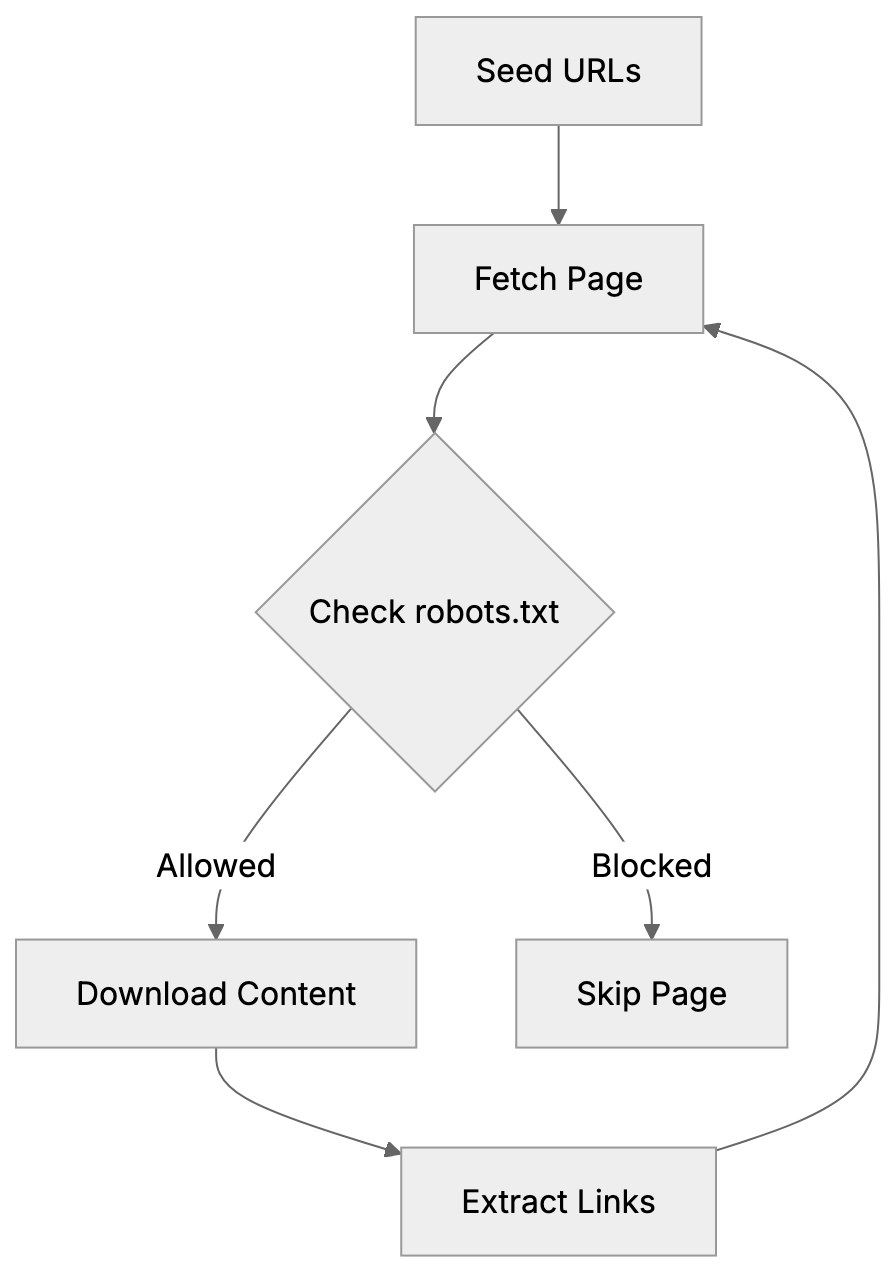
CCBot Crawling Process:
Common Crawl, a nonprofit based in California, aims to democratize access to web data for research and development. Before its establishment, only large tech companies could afford to crawl and store massive web content. This left small research teams and startups without access to vital large-scale web data. Common Crawl altered this by making petabytes of web data freely available to anyone. Researchers utilize these datasets for natural language processing, machine learning model training, academic studies, and search engine development. The data includes raw HTML, extracted text, metadata, and link graphs. AI companies often download these datasets to save on bandwidth costs and infrastructure expenses, using them for training chatbots, search engines, content generators, translation systems, and other AI applications. Common Crawl processes around 250-300 terabytes of uncompressed content per monthly crawl.
How CCBot Crawler Works
Common Crawl Dataset Structure:
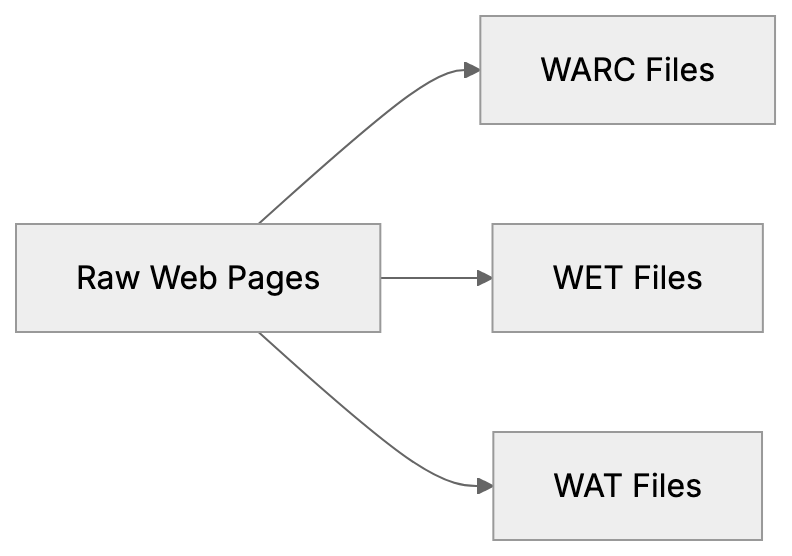
CCBot functions similarly to search engine crawlers like Googlebot, starting with seed URLs and following links to new pages. Monthly, it performs a fresh crawl to collect new and updated content. The crawler respects robots.txt files and Crawl-delay directives set by website owners. CCBot/2.0 sends requests from IP addresses resolving to *.crawl.commoncrawl.org domains, which can be verified by performing reverse DNS lookups. The crawler downloads HTML content, images, PDFs, and other file types, which Common Crawl processes into datasets stored on Amazon S3. These datasets include WARC files with raw data, WET files with extracted text, and WAT files with metadata, alongside an index for searching specific URLs or domains.
How to Check Your Site in Common Crawl
To verify if CCBot has crawled your website, search the Common Crawl index at index.commoncrawl.org by entering your domain or specific URLs. The search results show crawl inclusions and collection dates, displaying the crawl date, URL, and status code. You can also download the archived content to view what CCBot captured. The index covers monthly crawls going back several years, allowing you to track how your site appears over time. Another method involves using the Common Crawl Index Server API for programmatic queries. Website analytics tools typically list CCBot in your server logs with its user agent string, highlighting visits as Mozilla/5.0 compatible with CCBot/2.0.
Blocking CCBot Using Robots.txt
You can block CCBot from crawling your website using robots.txt placed at your domain’s root. To block CCBot completely, add these lines:
User-agent: CCBot
Disallow: /
This directive tells CCBot not to crawl any pages on your site. The crawler checks robots.txt before requesting pages and complies. Alternatively, block specific sections:
User-agent: CCBot
Disallow: /private/
Disallow: /admin/
To slow down CCBot without entirely blocking it, use a Crawl-delay directive:
User-agent: CCBot
Crawl-delay: 10
This instructs CCBot to wait 10 seconds between requests, reducing server load. Remember, blocking CCBot prevents future crawling but does not remove content already in previous crawls, as archived pages remain in existing Common Crawl datasets.
Common Crawl Opt-Out Registry
Common Crawl offers an opt-out registry for site owners seeking complete exclusion. This process goes beyond blocking future crawls by signaling that your content shouldn’t be used for AI training. However, existing datasets remain unaffected. AI companies might have already used these for model training, and the opt-out applies solely to Common Crawl. Other web crawlers might still gather your content. To use the registry, domain ownership verification via a verification file on your website or DNS records is required. After verification, Common Crawl adds your domain to their exclusion list.
Verifying Authentic CCBot Crawlers
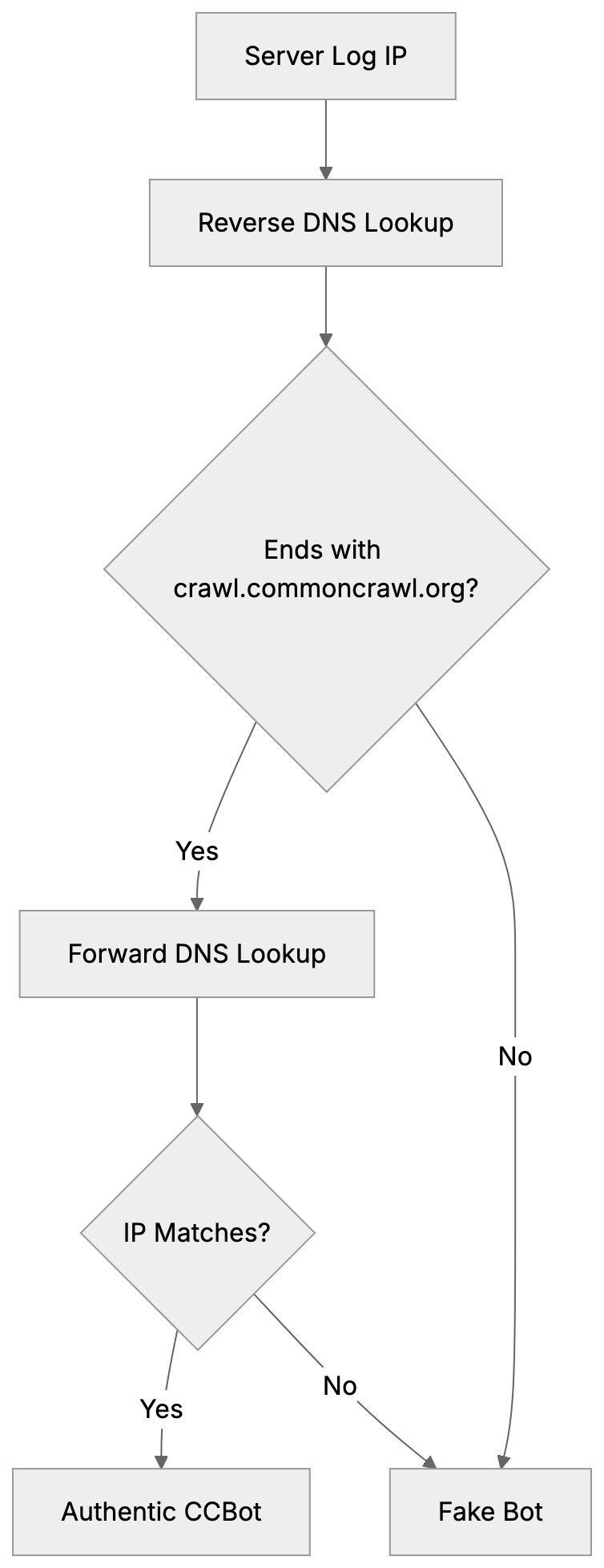
Imposter bots can mimic CCBot to bypass security systems, making verification crucial. Authentic CCBot traffic originates from IPs resolving to *.crawl.commoncrawl.org. Verification involves reverse DNS lookups on IP addresses from server logs showing the CCBot user agent. Ensure the hostname ends with crawl.commoncrawl.org, followed by a forward DNS lookup to match the original IP. This double-check avoids DNS spoofing. A failure in pattern matching likely indicates a fake bot, as legitimate CCBot follows robots.txt rules.
CCBot vs Other Web Crawlers
Understanding CCBot in comparison to other crawlers aids in informed blocking decisions. Below is a comparison of major crawlers:
| Crawler | User Agent | Purpose | Respects Robots.txt | Monthly Volume |
|---|---|---|---|---|
| CCBot | CCBot/2.0 | Public datasets for AI training | Yes | 3-5 billion pages |
| Googlebot | Googlebot/2.1 | Search engine indexing | Yes | Hundreds of billions |
| GPTBot | GPTBot/1.0 | OpenAI training data | Yes | Unknown |
| Bingbot | bingbot/2.0 | Search engine indexing | Yes | Tens of billions |
| Bytespider | Bytespider | ByteDance data collection | Yes | Unknown |
| Anthropic-AI | anthropic-ai | Claude training data | Yes | Unknown |
CCBot Verification Process:
CCBot focuses on creating open datasets, unlike Googlebot, which powers search results. AI training crawlers like GPTBot are dedicated solely to model training, whereas CCBot bridges this gap by providing publicly available training data. Blocking CCBot won’t affect search engine rankings; it only impacts inclusion in Common Crawl datasets.
AI Training Data Reality
Large language models extensively use Common Crawl datasets for training. GPT-3, for example, relied on them for 60% of its training tokens. Models like GPT-2, BERT, RoBERTa, and T5 also benefit from these datasets. Once a dataset is released, it is permanently available: AI companies can download and use these datasets anytime. Blocking CCBot today doesn’t prevent use of already available datasets containing your content. Content you published years ago likely resides in past datasets, proving that preventing future inclusion requires early action. Blocking CCBot ahead of future crawls becomes pivotal, whereas previously published datasets remain perpetually accessible.
Impact of Blocking CCBot
Blocking CCBot entails benefits and limitations. Benefits include preventing your content’s appearance in future datasets, consequently reducing AI models’ chances of training on it. Additionally, it saves bandwidth, reducing server load from CCBot’s monthly downloads. For sites with sensitive information, it aids in maintaining privacy. However, it doesn’t remove already published content from existing datasets, which AI companies still use. Blocking CCBot doesn’t affect other crawlers from AI companies like OpenAI, Google, or Anthropic, who operate separately. Each must be individually blocked in robots.txt. Content brokers who independently crawl the web might also license your content. Blocking CCBot doesn’t impact search engine visibility as Common Crawl isn’t a search engine.
Technical Details of CCBot/2.0
Current CCBot identifies itself with the user agent string CCBot/2.0. Typically formatted as Mozilla/5.0 (compatible; CCBot/2.0; +http://commoncrawl.org/faq/), it provides a URL for more information to website owners. CCBot mainly uses HTTP GET requests to download pages, understanding HTTP redirects, and handling status codes. It respects standard caching headers and adapts to server conditions. Utilizing a distributed infrastructure, IP addresses frequently change. Hence, reverse DNS verification is vital over IP blocklisting. Employing polite crawling practices, CCBot maintains delays between requests. The default crawl rate adapts with server response times and page availability.
What Happens After Blocking
Once you block CCBot using robots.txt, your changes take effect during the next crawl. CCBot evaluates robots.txt before crawling, heeding your new rules, and ceases requests from your domain in future crawls. As a result, your domain won’t appear in subsequent Common Crawl datasets. However, past data remains intact in earlier datasets. AI companies having prior datasets continue their utilization, as there’s no removal mechanism for already archived content. Each monthly dataset remains a historical snapshot. Should you later decide to permit CCBot, simply modify robots.txt rules; CCBot will resume in future crawls, but previous datasets will show a gap.
Monitoring CCBot Activity
Monitoring CCBot’s activity on your site can be achieved through various methods. Your server access logs display all crawls, including the CCBot user agent string. Search these logs to discern crawl patterns and frequencies. Web analytic platforms categorize CCBot traffic under bots or crawlers, often permitting custom segments to isolate CCBot activity. Server monitoring tools can alert you to unusual activity or traffic spikes. If high CCBot traffic is detected, verify your robots.txt Crawl-delay effectiveness. Regularly check Common Crawl’s index at index.commoncrawl.org to see your archival inclusion, automating these checks using the Common Crawl API if advanced monitoring is desired. Track specific URLs from your domain across datasets for comprehensive content capture understanding.
Legal and Ethical Considerations
Common Crawl, underpinned by the belief in public web content’s archival and shared use, operates on fair use principles and archiving traditions. However, legal frameworks regarding web scraping and AI training data vary globally. While the EU enforces stricter data protection than the U.S., enforcing terms against crawlers with permissible robots.txt proves difficult. Content creators argue using their work in AI training without explicit permission or compensation is unethical, while others see archiving as implicit research use. The debate continues among legal experts, technologists, and content creators. Common Crawl maintains robots.txt respect and opt-out mechanisms, claiming adequate control for site owners—a sufficiency question still evolving legally and politically.
End
CCBot powers Common Crawl datasets, extensively used in AI training, crawling 3 to 5 billion pages monthly while respecting robots.txt directives. Block CCBot easily by adding User-agent: CCBot and Disallow: / to your robots.txt. Verify authentic CCBot traffic with reverse DNS lookups to *.crawl.commoncrawl.org. Confirm your site’s archive presence by searching index.commoncrawl.org. Remember, blocking prevents future crawls but doesn’t erase already archived content, which remains indefinitely available for AI training. GPT-3’s use of Common Crawl data underscores its significant dataset impact. Decisions on blocking CCBot should weigh content sharing priorities, AI training participation, and bandwidth considerations. This crawler remains a growing AI training data source.
Frequently Asked Questions
How can I find out if CCBot has crawled my site?
You can check if CCBot has crawled your website by searching the Common Crawl index at index.commoncrawl.org. Enter your domain or specific URLs to see crawl inclusions, collection dates, and the status of each request made by CCBot.
What should I do if I want to prevent CCBot from accessing my website?
To block CCBot, add specific lines to your robots.txt file located at your domain's root. For example, including User-agent: CCBot and Disallow: / will prevent CCBot from crawling any pages on your site.
Does blocking CCBot remove all existing content from Common Crawl datasets?
No, blocking CCBot only prevents future crawling of your site. Existing content that has already been archived in previous datasets will remain available for AI training.
How do I verify that the CCBot traffic I'm seeing is legitimate?
Legitimate CCBot traffic comes from IP addresses that resolve to *.crawl.commoncrawl.org. You can perform reverse DNS lookups on suspicious IPs to confirm they are authentic before taking further action.
What is the Common Crawl opt-out registry, and how does it work?
The Common Crawl opt-out registry allows site owners to exclude their domains from being used for AI training without affecting existing datasets. The process requires verifying domain ownership through a specified file on your site or DNS records.
Will blocking CCBot impact my website's search engine rankings?
Blocking CCBot will not affect your search engine rankings, as CCBot's role is to create open datasets rather than serve as a search engine. Your site's visibility in search results will remain unchanged.
How can I monitor CCBot's activity on my site?
To monitor CCBot's activity, check your server access logs, which list visits from CCBot. Additionally, web analytics tools can help track CCBot traffic, and you can set alerts for unusual activity patterns or spikes.