Anthropic ClaudeBot, Claude-Web & anthropic-ai: Complete Guide
Complete guide to Anthropic's crawlers: ClaudeBot, Claude-User, Claude-SearchBot, Claude-Web & anthropic-ai. Learn how to block or allow them via robots.txt.
Table of Contents
- Introduction
- What Are Anthropic’s Crawlers and User Agents
- Why These Crawlers Exist and Their Purpose
- How Companies and Users Interact With These Bots
- Technical Details and User Agent Strings
- How to Block or Allow ClaudeBot in robots.txt
- Comparison With Other AI Crawlers
- Verifying Bot Access and Monitoring
- Privacy and Data Collection Concerns
- Getting Help and Additional Resources
- Conclusion
- Introduction
- What Are Anthropic’s Crawlers and User Agents
- Why These Crawlers Exist and Their Purpose
- How Companies and Users Interact With These Bots
- Technical Details and User Agent Strings
- How to Block or Allow ClaudeBot in robots.txt
- Comparison With Other AI Crawlers
- Verifying Bot Access and Monitoring
- Privacy and Data Collection Concerns
- Getting Help and Additional Resources
- Conclusion
Introduction
Anthropic operates several web crawlers and bots to support their Claude AI assistant. These bots collect data from websites for different purposes. ClaudeBot handles training data collection. Claude-User supports real-time user queries. Claude-SearchBot provides search capabilities. Two heritage user agents exist too, Claude-Web and anthropic-ai, though they aren’t officially documented anymore. Understanding these crawlers matters for web developers, SEO experts, and site owners who want to control how Anthropic accesses their content. You can manage these bots through your robots.txt file using the Anthropic robots.txt format. Since No IP ranges are published by Anthropic, user agent strings are your primary control method. This guide covers all five known Anthropic user agents, including the Claude bot, and shows you exactly how to manage them on your website.
What Are Anthropic’s Crawlers and User Agents
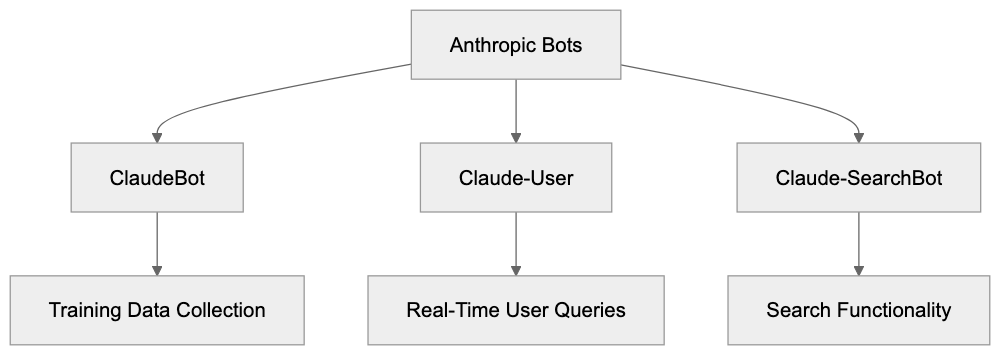
Anthropic operates several distinct bots that crawl the web. Each serves a different function in their AI ecosystem:
Anthropic Bot Ecosystem Overview:
- ClaudeBot is the primary crawler that collects training data for Claude AI models. The user agent string looks like this: ClaudeBot/1.0. This bot visits websites to gather text content that might be used in model training.
- Claude-User supports real-time queries when users ask Claude to fetch current information from the web.
- Claude-SearchBot provides search functionality within Claude.
These are the three officially documented crawlers you’ll find in Anthropic’s support documentation. Two heritage user agents also exist. Claude-Web and anthropic-ai were used in earlier versions of Anthropic’s systems. They still appear in server logs occasionally but aren’t mentioned in current official docs. Web developers report seeing these user agents even though Anthropic doesn’t actively document them anymore. All five user agents, including the Claude user agent, can be controlled through standard robots.txt directives. The bots respect standard crawling protocols and will follow your robots.txt rules.
Why These Crawlers Exist and Their Purpose
AI companies need massive amounts of text data to train language models. ClaudeBot exists primarily for this purpose, collecting web content that becomes part of training datasets. This is similar to how other AI companies like OpenAI with GPTBot or Google with GoogleBot operate. The training process requires varied text from across the internet to help the AI understand language patterns, facts, and reasoning.
Claude-User serves a completely different purpose. When someone asks Claude a question that requires current information, the AI needs to fetch that data in real time. For example, if you ask Claude about today’s weather or recent news, Claude-User might retrieve that information from websites. This is not for training; it’s for answering specific user queries. Claude-SearchBot enables search features within the Claude interface.
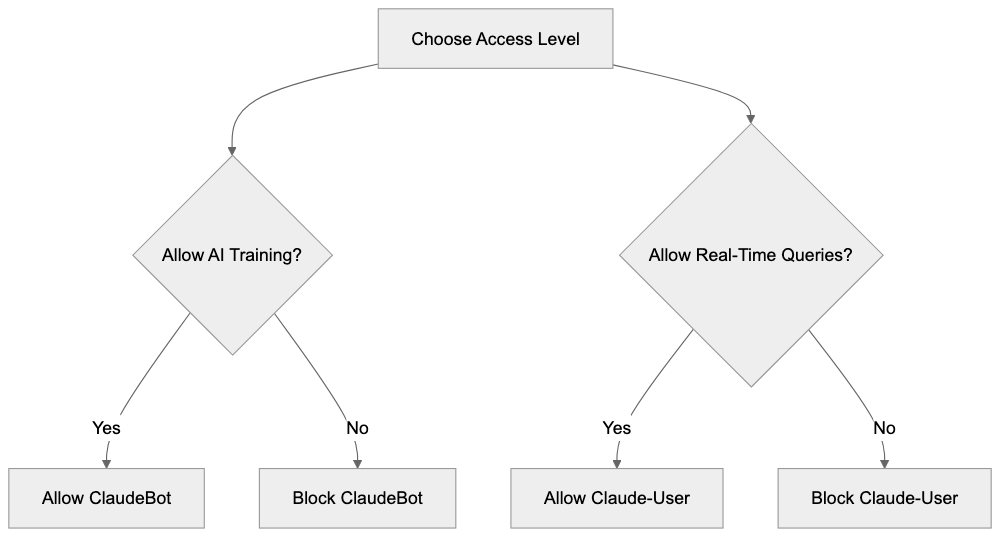
The distinction between training crawlers and real-time query bots is important. Training data collection happens in bulk over time. Real-time queries happen on demand when users need current information. Some website owners want to block ClaudeBot but allow real-time query bots. Others prefer to block all AI crawlers completely. Your robots.txt configuration determines what you allow.
How Companies and Users Interact With These Bots
Anthropic uses ClaudeBot to systematically crawl websites and build their training corpus. The bot follows links, extracts text content, and stores it for potential use in model development. This happens continuously as they work on improving Claude models. Website owners see ClaudeBot requests in their server logs just like any other crawler.
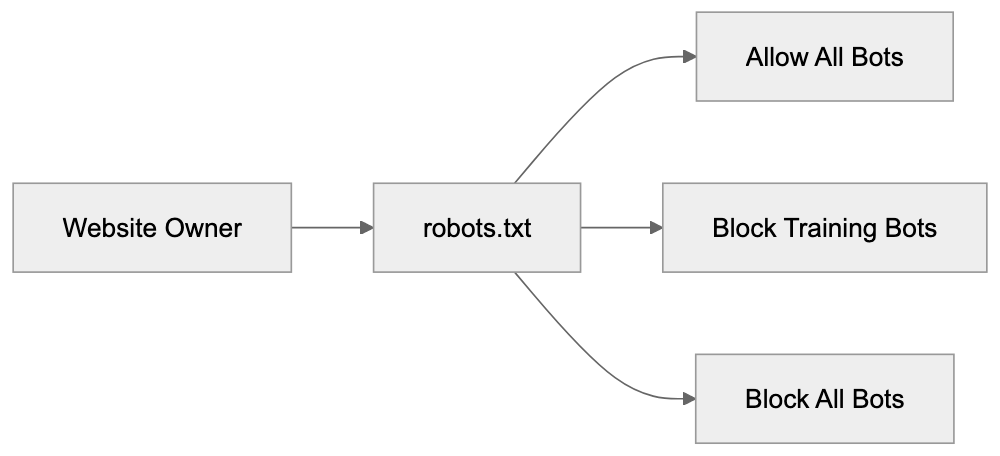
Bot Access Control Methods:
When Claude users ask questions that need real-time data, Claude-User makes targeted requests to specific websites. These aren’t bulk crawling operations; they’re individual fetches based on user queries. For example, a user might ask Claude to summarize a specific article. Claude-User would then visit that URL and retrieve the content for processing.
Website owners have several options for managing these bots. Some allow all Anthropic crawlers because they want their content to be part of AI training and responses. Others block ClaudeBot but allow Claude-User; they don’t want their content used for training, but they’re okay with real-time queries. Some block everything from Anthropic entirely. SEO experts and content marketers need to consider these choices carefully. Blocking training bots means your content won’t influence the AI’s knowledge base. Blocking query bots means Claude users can’t access your content through the AI.
Small business owners running websites should check their server logs to see if Anthropic bots are visiting. The frequency of visits varies by site. High-authority sites with frequently updated content see more bot traffic. Smaller sites might see occasional visits. You can contact Anthropic at bots@anthropic.com if you have specific questions or concerns about their crawlers.
Technical Details and User Agent Strings
Each Anthropic bot identifies itself with a specific user agent string. Here are the confirmed user agents:
- ClaudeBot/1.0 - Primary training data crawler
- Claude-User - Real-time user query support
- Claude-SearchBot - Search functionality
- Claude-Web - Heritage crawler, undocumented
- anthropic-ai - Heritage crawler, undocumented
These user agent strings appear in your web server logs when the bots visit. Unlike some other crawlers, Anthropic doesn’t publish IP address ranges for their bots. This means you can’t reliably block them by IP address. User agent blocking in robots.txt is the recommended approach using Anthropic robots.txt instructions.
Anthropic maintains information about their crawlers at https://www.anthropic.com/robots. The two heritage agents Claude-Web and anthropic-ai don’t appear in current documentation, but are still observed in the wild by webmasters and developers. Anthropic respects robots.txt standards. If you disallow a user agent, the bot will honor that directive and not crawl the specified paths. The bots also respect crawl-delay directives if you want to limit how fast they access your site. Standard robots.txt syntax works with all Anthropic crawlers.
How to Block or Allow ClaudeBot in robots.txt
Controlling Anthropic crawlers happens through your robots.txt file. This file sits in your website root directory and tells bots what they can and cannot access. Here’s how to block all Anthropic bots completely:
User-agent: ClaudeBot
Disallow: /

User-agent: Claude-User
Disallow: /

User-agent: Claude-SearchBot
Disallow: /

User-agent: Claude-Web
Disallow: /

User-agent: anthropic-ai
Disallow: /
This configuration blocks all five known Anthropic user agents, including ClaudeBot, from accessing any part of your site. The Disallow: / directive means no pages are accessible to these bots.
If you want to allow real-time queries but block training data collection, you could use this approach:
User-agent: ClaudeBot
Disallow: /

User-agent: Claude-Web
Disallow: /

User-agent: anthropic-ai
Disallow: /
This blocks the training crawlers but leaves Claude-User and Claude-SearchBot unblocked. They can still access your content for real-time user queries.
To allow everything from Anthropic, you simply don’t include any blocking directives for their user agents. Or you can explicitly allow them:
User-agent: ClaudeBot
Allow: /

User-agent: Claude-User
Allow: /

User-agent: Claude-SearchBot
Allow: /
You can also block specific directories while allowing others. For example, to protect your admin area but allow everything else:
User-agent: ClaudeBot
Disallow: /admin/
Disallow: /private/
Allow: /
Remember, robots.txt is a request, not a security measure. Well-behaved bots follow the rules, but malicious actors can ignore them. For actual security, use proper authentication and access controls. robots.txt is for managing legitimate crawlers like ClaudeBot.
After updating your robots.txt file, the changes take effect the next time bots check the file. Most crawlers check robots.txt before or during each crawl session. You can verify your robots.txt syntax using online validators to make sure there are no formatting errors.
Comparison With Other AI Crawlers
Several AI companies run web crawlers for training data and real-time queries. Understanding how Anthropic’s approach compares helps you make informed decisions about bot management.
| Crawler | Company | Primary Purpose | Published IP Ranges | User Agent |
|---|---|---|---|---|
| ClaudeBot | Anthropic | Training data | No | ClaudeBot/1.0 |
| GPTBot | OpenAI | Training data | Yes | GPTBot/1.0 |
| GoogleBot-Extended | AI training | No | Google-Extended | |
| CCBot | Common Crawl | Dataset building | Yes | CCBot/2.0 |
| Bingbot | Microsoft | Search & AI | Yes | Mozilla/5.0… Bingbot |
robots.txt Decision Flow:
Anthropic doesn’t publish IP ranges for their crawlers. OpenAI and Common Crawl do provide IP lists, which allows for IP-based blocking. Google also doesn’t publish specific IPs for GoogleBot-Extended. Most AI companies recommend using robots.txt user agent blocking as the primary control method.
GPTBot from OpenAI works similarly to ClaudeBot; it collects training data for language models. OpenAI provides both user agent blocking and IP range blocking options. They also offer a web form for removal requests. Anthropic provides email contact at bots@anthropic.com for crawler concerns.
GoogleBot-Extended is Google’s AI training crawler, separate from regular GoogleBot. Blocking GoogleBot-Extended stops your content from being used in Bard and other Google AI products, but doesn’t affect regular search indexing. This separation mirrors how Anthropic separates training crawlers from query bots.
Common Crawl’s CCBot builds publicly available web archives used by many AI companies for training. Blocking CCBot prevents inclusion in Common Crawl datasets, but doesn’t stop other companies from crawling you directly. CCBot has been around longer than most AI-specific crawlers and is widely recognized.
Microsoft’s approach with Bingbot is different; they use the same crawler for both search indexing and AI training. Blocking Bingbot affects your search presence. Anthropic’s separation of ClaudeBot for training and Claude-User for queries gives website owners more granular control.
Each company has different policies about respecting robots.txt and different transparency levels about their crawling activities. Anthropic falls in the middle; they document their main crawlers but don’t provide IP ranges. OpenAI provides more technical details while some smaller AI companies provide almost no documentation.
Verifying Bot Access and Monitoring
You can check if Anthropic bots, including the Claude bot and Anthropic crawler, are accessing your site by examining web server logs. Most hosting platforms provide access to these logs through their control panel. Look for the user agent strings mentioned earlier: ClaudeBot, Claude-User, Claude-SearchBot, Claude-Web, or anthropic-ai.
Server log entries show the timestamp, IP address, requested URL, user agent, and response code. A typical log entry for ClaudeBot might look like:
192.0.2.1 - - [15/Jan/2024:10:30:45] "GET /page.html HTTP/1.1" 200 "ClaudeBot/1.0"The response code 200 means the bot successfully accessed the page. A 403 or 404 code indicates blocked or missing content. After updating your robots.txt file, you should see 403 responses for blocked bots, or they should stop appearing in logs entirely.
Log analysis tools can help you track bot traffic over time. Popular options include AWStats, Webalizer, or commercial services like Google Analytics server logs combining. These tools can filter and summarize bot traffic by user agent.
Some website owners worry about bot traffic consuming server resources. For most sites, this isn’t a problem. Legitimate crawlers like ClaudeBot follow crawl-delay directives and don’t overwhelm servers. If you do see excessive requests, you can add a crawl-delay to your robots.txt:
User-agent: ClaudeBot
Crawl-delay: 10
This tells ClaudeBot to wait 10 seconds between requests. Not all bots support crawl-delay, but well-behaved ones do.
If you suspect a bot is ignoring your robots.txt rules, document the behavior with log entries and contact Anthropic at bots@anthropic.com. Provide specific examples with timestamps and URLs. Anthropic has been responsive to crawler concerns according to webmaster community reports.
Monitoring helps you understand how AI companies interact with your content. Some sites see daily visits from ClaudeBot while others see weekly or monthly visits. The frequency depends on your content update schedule, site authority, and topic relevance to AI training needs.
Privacy and Data Collection Concerns
When ClaudeBot crawls your site, it collects publicly accessible content. This is similar to how search engines work. The content may be used to train Claude AI models. If you publish content publicly on the web without authentication, crawlers can access it unless you block them.
Some website owners don’t want their content used for AI training. Common reasons include:
- Original creative work they want to protect
- Proprietary business information
- Content behind intended paywalls
- Personal blogs with private thoughts
- Competitive concerns about AI using their expertise
Blocking ClaudeBot and other training crawlers is completely valid. You control your content and can decide how it’s used. There’s no penalty from Anthropic for blocking their bots.
Other website owners actively want their content used in AI training. They see it as expanding their reach and influence. Open-source projects, educational content, and public information sites often allow all AI crawlers.
The distinction between training data collection and real-time queries matters for privacy too. When Claude-User fetches your content for a specific user query, that content goes to one user in context. When ClaudeBot collects training data, that content might be synthesized into the model’s general knowledge.
Content marketers need to weigh visibility against control. Allowing AI crawlers means your content influences AI responses, which could drive indirect traffic. Blocking crawlers maintains stricter control over content usage but reduces AI visibility.
Currently, there’s no standardized compensation model for content used in AI training. This is an evolving area with ongoing discussions in the tech community. For now, website owners make binary choices through robots.txt: allow or block.
Getting Help and Additional Resources
Anthropic provides official documentation about their crawlers at https://www.anthropic.com/robots. This covers ClaudeBot, Claude-User, and Claude-SearchBot with technical details and recommendations. The documentation gets updated periodically as their systems evolve.
For specific questions or concerns about Anthropic crawlers, email bots@anthropic.com. This is the official contact point for webmasters and site owners. Response times vary, but the address is actively monitored according to community reports.
The robots.txt standard is maintained by the Robots Exclusion Protocol community. You can find detailed syntax guides and examples at robotstxt.org. This helps make sure your robots.txt file is correctly formatted and will work with all crawlers.
Web developer communities like Stack Overflow and Webmasters Stack Exchange have discussions about managing AI crawlers. Search for ClaudeBot or Anthropic crawler to find real-world examples and solutions from other developers.
SEO expert forums discuss the implication of blocking or allowing AI crawlers. This is still an evolving topic as the industry figures out best practices. Different experts have different recommendations based on their content strategy philosophies.
Hosting provider documentation often includes sections on managing bot traffic and configuring robots.txt. Check your specific hosting platform’s help center for platform-specific instructions.
Browser developer tools and online robots.txt validators help you test your configuration. Google Search Console includes a robots.txt tester, though it’s designed for GoogleBot; it validates general syntax too.
Conclusion
Anthropic operates multiple crawlers for different purposes. ClaudeBot collects training data for AI models. Claude-User supports real-time user queries. Claude-SearchBot enables search features. Two heritage agents, Claude-Web and anthropic-ai, also exist, though they’re not officially documented anymore. Managing these bots happens through your robots.txt file using standard user agent directives. Anthropic doesn’t publish IP ranges, so user agent blocking is your primary control method. You can block all Anthropic crawlers, allow all of them, or selectively block training bots while allowing query bots. The choice depends on your content strategy and comfort level with AI data collection. Official documentation lives at https://www.anthropic.com/robots, and you can contact bots@anthropic.com with specific concerns. Understanding these crawlers helps web developers, SEO experts, and site owners make informed decisions about AI access to their content. The scene continues to evolve as AI companies and website owners shape sustainable relationships around content usage and access.
Frequently Asked Questions
What should I do if I want to block Anthropic bots from accessing my site?
You can block Anthropic bots by configuring your robots.txt file in the root directory of your website. Use the user agent strings provided in the article to disallow access to the specific bots you want to block.
How can I allow real-time queries but block training data collection?
In your robots.txt file, you can block the training bots like ClaudeBot, Claude-Web, and anthropic-ai while allowing Claude-User and Claude-SearchBot. This way, your content can still be retrieved for real-time queries without being used for training purposes.
Are there any restrictions on how I can block these crawlers?
Using the robots.txt file is the standard method for managing crawler access, but it's important to note that this is a request rather than a security measure. While well-behaved bots like those from Anthropic will respect these directives, malicious actors may ignore them.
How often do Anthropic bots visit websites?
The frequency of visits from Anthropic bots like ClaudeBot can vary depending on the website's authority and the frequency of content updates. High-authority sites may see regular visits, while smaller sites may experience visits less frequently.
Can I monitor Anthropic bot activity on my site?
Yes, you can monitor bot activity by checking your web server logs for entries that match the user agent strings of Anthropic's crawlers. This will provide you information about the nature and frequency of their visits.
What if I have concerns about data collection by Anthropic crawlers?
If you have specific concerns about the crawlers, you can reach out to Anthropic at bots@anthropic.com. They are actively monitoring this address and can provide assistance or address any issues you may have.
Is there a way to verify my robots.txt syntax?
Yes, there are several online validators available that can help you verify the syntax of your robots.txt file. You can also use Google's Search Console, which includes a robots.txt tester, although it is primarily for GoogleBot.