Google-Extended: Complete Guide to Blocking AI Crawlers
Learn how Google-Extended controls AI training access via robots.txt without affecting search rankings. Block Gemini and Vertex AI crawlers properly.
Table of Contents
- What is Google-Extended
- Why Google-Extended Exists
- How Google-Extended Works in Practice
- Google-Extended robots.txt Configuration
- Understanding the User Agent Situation
- Impact on Search Rankings and Visibility
- What Google-Extended Controls Access To
- Comparison with Other AI Crawler Controls
- Common Misconceptions About Google-Extended
- How to Verify Your Configuration
- Making the Decision for Your Site
- Conclusion
- What is Google-Extended
- Why Google-Extended Exists
- How Google-Extended Works in Practice
- Google-Extended robots.txt Configuration
- Understanding the User Agent Situation
- Impact on Search Rankings and Visibility
- What Google-Extended Controls Access To
- Comparison with Other AI Crawler Controls
- Common Misconceptions About Google-Extended
- How to Verify Your Configuration
- Making the Decision for Your Site
- Conclusion
What is Google-Extended
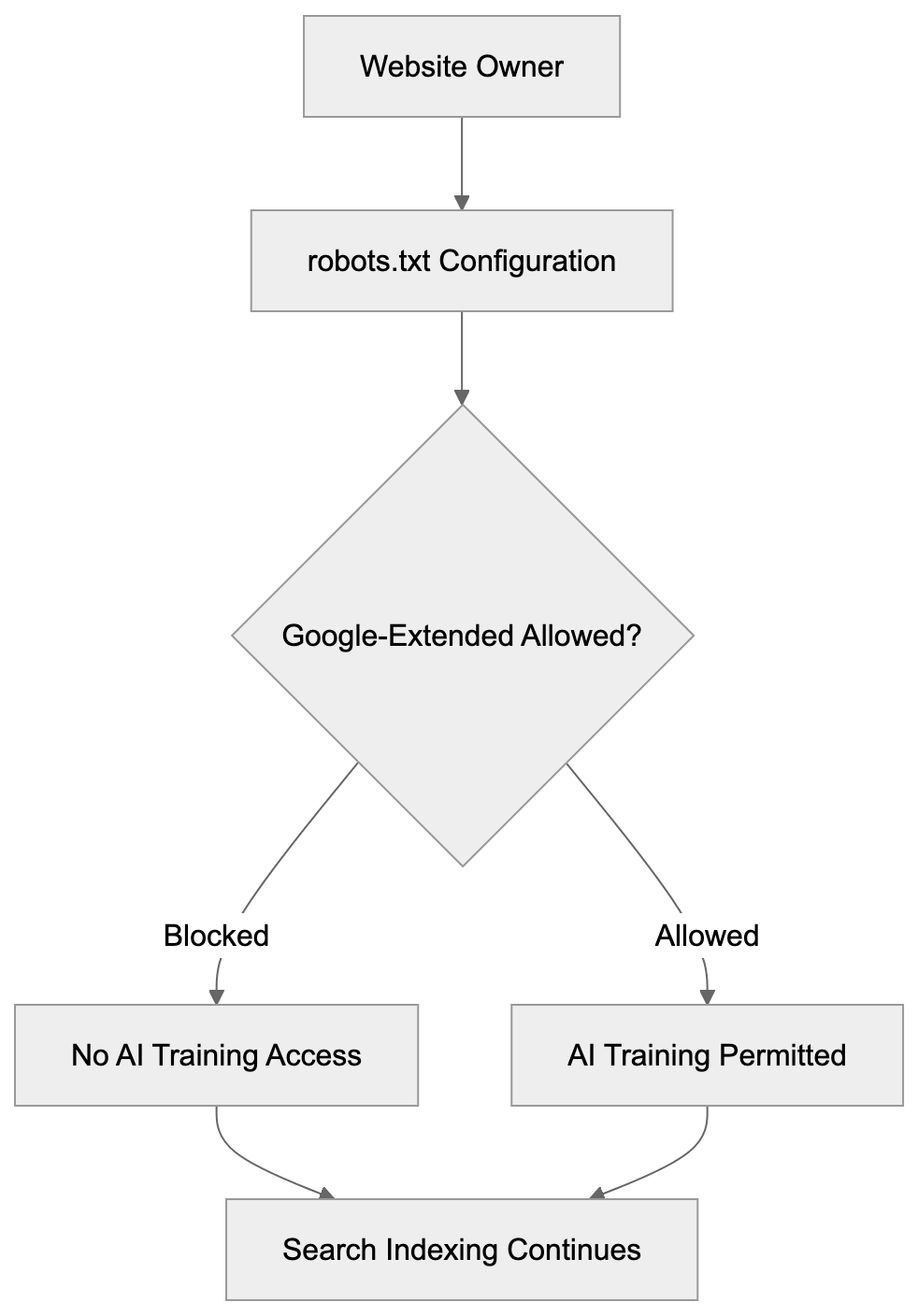
Google-Extended is a robots.txt token that controls whether Google can use your website content for AI training purposes. Introduced by Google in December 2023, it specifically governs access for products like Gemini Apps and Vertex AI API. Many website owners remain unaware that Google-Extended is not a separate crawler with its own user agent string. When Google crawls your site for AI training data, it appears in your server logs as regular Googlebot, leading to confusion since a different user agent is expected. It’s crucial to understand that blocking Google-Extended does not impact your site’s presence in Google Search results. Your search rankings remain unharmed, allowing you to permit Google to index your site for search while blocking AI training, or to permit both through straightforward robots.txt directives. The choice is yours through straightforward robots.txt directives.
Why Google-Extended Exists
Google developed Google-Extended to provide website owners control over AI training data collection. Previously, there was no way to distinguish between search indexing and AI model training, both utilizing the same Googlebot crawler. Website owners, particularly publishers, expressed concern over their content being used to train commercial AI products without explicit consent. News organizations and content creators desired the ability to opt-out of AI training while maintaining their search visibility. In response, Google created this separate control mechanism. The token addresses rising concerns among AI companies using web content to train large language models. Google-Extended reflects a broader industry trend towards granting content creators more control over their work’s usage. Other AI companies have introduced similar mechanisms. Its existence underscores Google’s acknowledgment of the distinction between indexing for search and scraping for AI training.
Google-Extended Control Mechanism:
How Google-Extended Works in Practice
Google-Extended operates through standard robots.txt file directives. You add specific rules to your robots.txt file to manage access. When Google’s systems prepare to crawl your site for AI training, they first check your robots.txt file. If Google-Extended is blocked, Google will not use that content for training Gemini Apps or Vertex AI models. However, regular Googlebot will continue crawling for search indexing purposes unless blocked separately. The key technical detail is that both activities use the same crawler infrastructure, so server logs will show Googlebot user agent strings regardless of the crawl type. The distinction is only at the robots.txt policy level. Google’s systems internally track which content is permitted for AI training based on your robots.txt directives. Blocking Google-Extended means that content is filtered out of AI training datasets but can still appear in search results, knowledge panels, and other Google Search features. Blocking applies only to AI model training for Gemini and Vertex AI products.
Google-Extended robots.txt Configuration
How Google-Extended Differs from Traditional Crawling:
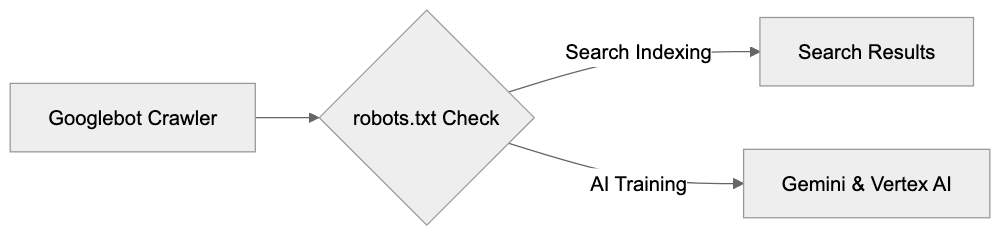
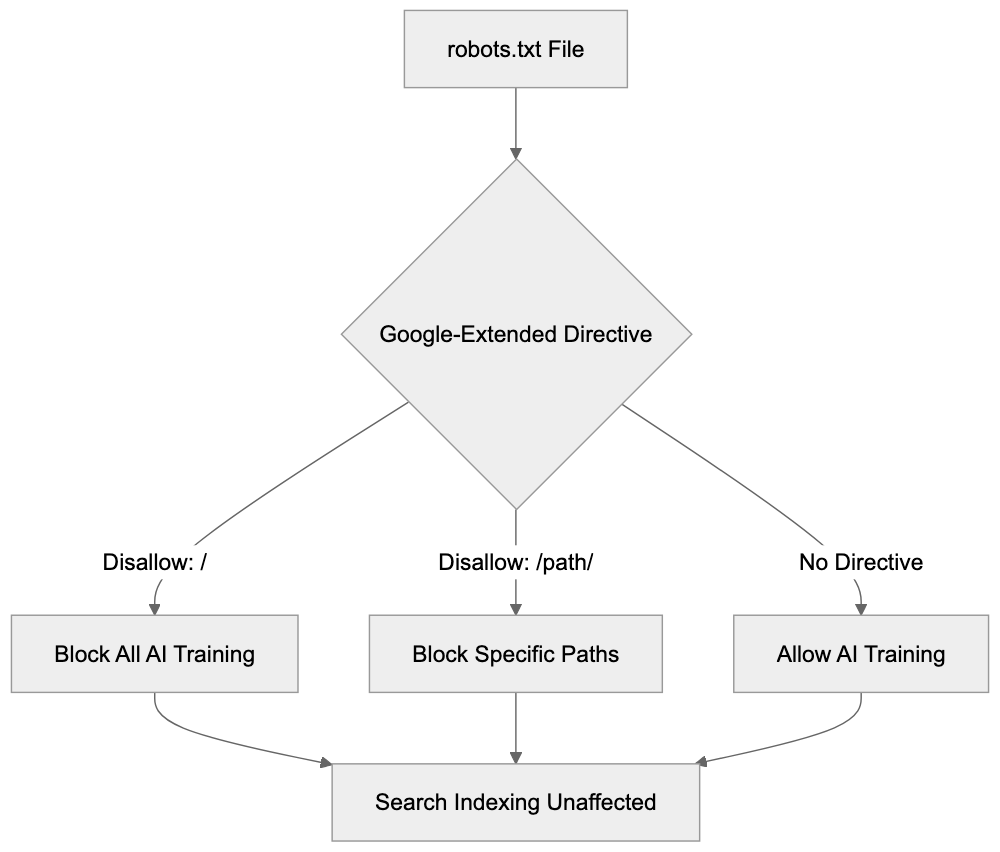
Configuring Google-Extended in your robots.txt file is straightforward, following standard robots.txt conventions. To block Google-Extended while allowing normal search indexing, add these lines to your robots.txt file:
User-agent: Google-Extended
Disallow: /
This blocks all AI training access to your entire site while Google Search indexing continues normally. To block only specific sections, specify paths:
User-agent: Google-Extended
Disallow: /premium-content/
Disallow: /articles/
This permits AI training on most of your site but blocks specific directories. To allow everything for AI training, you don’t need any Google-Extended directives; the default behavior allows access. You can also combine directives for different user agents:
User-agent: Googlebot
Disallow: /private/

User-agent: Google-Extended
Disallow: /
This setup blocks search indexing of your private directory while blocking all AI training access. Remember, the order of directives doesn’t matter; robots.txt files are processed by matching the most specific user agent first. Ensure your robots.txt file is accessible at yourdomain.com/robots.txt. Test it using Google Search Console’s robots.txt tester tool. Changes take effect the next time Google crawls your robots.txt file, typically within hours for active sites.
Understanding the User Agent Situation
The Google-Extended user agent situation often confuses many. Here’s what you need to know: Google-Extended is not a separate HTTP user agent string appearing in server logs; it’s only a robots.txt token. AI training crawls come from regular Googlebot, showing the standard Googlebot user agent string in server logs:
Mozilla/5.0 (compatible; Googlebot/2.1; +http://www.google.com/bot.html)You cannot distinguish AI training crawls from search indexing crawls through user agent strings, as they are identical. Consequently, you cannot block AI training at the server or firewall level using user agent filtering. The only control mechanism is robots.txt directives. While some website owners prefer server-level controls, robots.txt remains the industry standard method for crawler control. Google opted for a robots.txt token implementation for Google-Extended, avoiding a separate crawler with a distinct user agent. This simplifies infrastructure and reduces bandwidth usage, preventing confusion over which crawler to permit for search visibility. However, this design choice reduces transparency in server logs, necessitating reliance on Google’s adherence to your robots.txt directives, as supported by its public documentation and track record.
Impact on Search Rankings and Visibility
Blocking Google-Extended has zero impact on your Google Search rankings—critical to understand. Your site continues to appear in search results as before. Google explicitly states this in official documentation. There’s a complete separation between search indexing and AI training. Googlebot handles search indexing, while Google-Extended controls only AI training access for Gemini Apps and Vertex AI API. These are distinct product lines with separate data pipelines. Blocking AI training does not send negative signals to Google’s search ranking algorithms, so your site won’t be penalized or deprioritized. Traffic from Google Search remains unaffected, and featured snippets, knowledge panels, and other search features continue working normally. Some website owners fear that blocking Google-Extended could damage their relationship with Google. This concern is unfounded. Google designed the token to provide you with this choice, meaning its appropriate use is perfectly acceptable. Many major publishers and content sites block Google-Extended while maintaining strong search visibility. The decision should be based on your content strategy and business model, not fear of search ranking impacts.
What Google-Extended Controls Access To
Google-Extended specifically controls content access for certain Google AI products: chiefly Gemini Apps and Vertex AI API. Gemini Apps includes the conversational AI interface available to consumers; when users interact with Gemini, asking questions, the AI utilizes training data. Blocking Google-Extended prevents your content from being part of that training process. Vertex AI is Google’s enterprise AI platform, enabling developers and businesses to build custom AI applications. Its API includes features like generative AI models; Google-Extended regulates your content’s availability for training or improvement of these models. Grounding with Google Search is another impacted feature, enhancing AI responses with current web info. Blocking Google-Extended might affect your content’s appearance in grounded responses, so consult Google’s documentation for current behavior. Notably, Google-Extended does not control regular Google Search results, Google Assistant responses based on search, or other non-AI training features, as its purpose pertains solely to AI model training and enhancement.
Comparison with Other AI Crawler Controls
Google-Extended is among several AI crawler control mechanisms for website owners. Other AI companies offer similar tools. Here’s a comparison of major options:
| Service | robots.txt Token | Separate User Agent | Controls AI Training | Affects Search/Core Function |
|---|---|---|---|---|
| Google-Extended | Yes | No | Yes (Gemini, Vertex AI) | No (Search unaffected) |
| GPTBot (OpenAI) | Yes | Yes | Yes (ChatGPT, API) | No (no search product) |
| CCBot (Common Crawl) | Yes | Yes | Yes (dataset) | No (no search product) |
| Anthropic-AI | Yes | Yes | Yes (Claude) | No (no search product) |
| Bingbot | No separate token | Yes | Integrated | Yes (blocks Bing Search too) |
robots.txt Configuration Options:
OpenAI’s GPTBot, for instance, has both a robots.txt token and a distinct user agent string, allowing identification of GPTBot crawls in server logs. Blocking GPTBot stops your content’s use in training ChatGPT and API models. Common Crawl’s CCBot works similarly, with a distinct user agent and compliance with robots.txt. Many AI companies utilize Common Crawl data for training, so blocking CCBot has a broad impact. Anthropic-AI’s approach is akin for Claude models. Contrarily, Microsoft’s Bingbot lacks a separate token for AI training versus search; blocking Bingbot eliminates Bing Search indexing and AI training, offering less granular control than Google-Extended. Google-Extended’s key advantage is its separation of search and AI training. Since most other companies lack a major search product, this distinction doesn’t apply.
Common Misconceptions About Google-Extended
Several misconceptions about Google-Extended circulate among website owners and developers. The first is that blocking Google-Extended will hurt search rankings—false. Google confirms no ranking impact. The second is that Google-Extended appears as a separate user agent in server logs—incorrect. Only Googlebot appears in logs. The third is that Google-Extended blocks all Google AI features—not true; it only blocks training for Gemini Apps and Vertex AI. Search features using AI, like enhancements, are unaffected. The fourth is that active permission is necessary—false; the default allows Google-Extended unless explicitly blocked. The fifth is its new and experimental nature—incorrect; it’s a stable, documented feature since 2023. The sixth is that blocking stops all AI use of your content—not accurate; it only blocks Google’s training, and other companies may still crawl and use your content unless their crawlers are also blocked. Understanding these misconceptions aids informed decisions about implementing Google-Extended controls.
How to Verify Your Configuration
After adding Google-Extended directives to your robots.txt file, verify the configuration works correctly. First, ensure your robots.txt file is publicly accessible by visiting yourdomain.com/robots.txt in a web browser, checking for your robots.txt content including the Google-Extended directives. A 404 error indicates the file isn’t correctly located. Second, use Google Search Console’s robots.txt tester. Log into Search Console, select your property, and navigate to the robots.txt tester. Enter a URL from your site and select the Google-Extended user agent from the dropdown. Click test; the tool reveals whether that URL is blocked or allowed for Google-Extended. Third, verify Googlebot isn’t blocked unless intended, testing with the Googlebot user agent in the same tool to ensure it’s allowed for pages intended for indexing. Fourth, check for syntax errors; the robots.txt tester flags grammatical issues. Common problems include missing colons, incorrect capitalization, or invalid directives. Fifth, await Google’s robots.txt re-crawl; changes aren’t immediate. Google typically re-crawls robots.txt files within hours for active sites; check the last crawl date in Search Console. Remember, server logs won’t verify Google-Extended behavior due to its use of the standard Googlebot user agent.
Making the Decision for Your Site
Deciding whether to block Google-Extended depends on your specific situation and goals. Consider these factors: if you publish original content necessitating significant investment to create, blocking may make sense. Your content is valuable intellectual property, possibly unsuitable for AI models that compete with you. Many news organizations and publishers block Google-Extended for this reason. If you run an e-commerce site with product descriptions, consider whether AI training helps or harms you; AI systems proficient in describing products may reduce traffic to your site, or they might aid customers in finding your products. The answer varies by business model. If running an information or educational site funded by advertising, AI systems using your content without driving traffic could damage revenue, in which case blocking prevents this. If seeking maximum exposure and indifferent to AI training, allowing Google-Extended makes sense as your content reaches more systems and potentially more users. Blocking is reversible; robots.txt changes are simple, allowing restriction lifting later. Consistency with other AI crawlers is also worth considering—if GPTBot and CCBot are blocked, maintaining a consistent policy by blocking Google-Extended might be best. Whatever the decision, document your reasoning and review periodically as the AI scene evolves.
Conclusion
Google-Extended provides website owners with precise control over AI training while preserving search visibility. It operates through standard robots.txt directives, not separate user agent strings, so server logs don’t reveal AI training crawls, yet configuration is simple. The token controls access for Gemini Apps, Vertex AI, and related Google AI products. Blocking Google-Extended does not affect search rankings or Google Search presence, a separation unique compared to most other crawlers. Setup involves adding a few lines to your robots.txt file; by default, access is allowed unless explicitly blocked. Whether to block depends on your content strategy, business model, and intellectual property concerns. Many publishers block to protect original content, while others allow for broader reach. This decision is reversible through simple robots.txt adjustments. Understanding that Google-Extended is a policy token, not a technical crawler variant, clarifies the system’s functionality and informs your site’s AI training participation decisions.
Frequently Asked Questions
How can I block Google-Extended on my website?
You can block Google-Extended by modifying your robots.txt file. To do this, add the following lines: User-agent: Google-Extended followed by Disallow: / to block all AI training access to your site. To block specific sections, specify the directories you want to restrict.
Will blocking Google-Extended affect my site's search rankings?
No, blocking Google-Extended will not impact your search rankings. Google has confirmed that there is a complete separation between search indexing and AI training, so your site’s visibility in search results remains unaffected.
What is the difference between Google-Extended and traditional Googlebot crawling?
Google-Extended is a token used in the robots.txt file specifically for controlling access to your content for AI training purposes. Regular Googlebot crawling is for search indexing. Despite using the same user agent string, the two processes are treated separately in terms of access control.
How do I verify that my robots.txt changes are correctly implemented?
You can verify your changes by visiting yourdomain.com/robots.txt to ensure your directives appear as intended. Additionally, using Google Search Console's robots.txt tester can help you confirm whether specific pages are blocked or allowed based on your directives.
Is blocking Google-Extended reversible?
Yes, blocking Google-Extended is reversible. You can easily modify your robots.txt file to change permissions at any time, allowing or blocking access for AI training as per your needs.
What should I consider before deciding to block Google-Extended?
Consider the value of your content, your business model, and whether AI training could benefit your website traffic. If you have valuable original content, blocking may be wise, while for others, it might be beneficial to allow access for wider reach.
What types of content does Google-Extended control access to?
Google-Extended specifically controls access for certain Google AI products, such as Gemini Apps and Vertex AI API. Blocking it prevents your content from being included in the training datasets for these platforms while still allowing for traditional search indexing.